|
|
|
It's easy to
handle... At left
- The S1 Pro is significantly smaller,
and around 25% lighter than the popular
Nikon D1. (Good
news for those who dread the "lug
factor" of most pro class
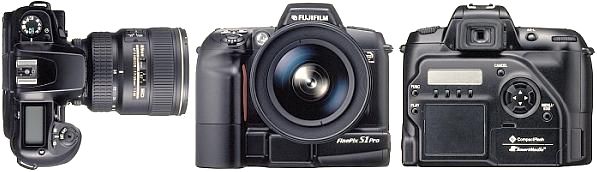
digitals.) And it's easy to
use... Built on the
Nikon N60 35mm film camera body, the Fuji S1 Pro
is strikingly simple to learn and operate. For
those who have ever used an interchangeable lens
35mm or APS single lens reflex film camera, the
learning curve will be short. The controls and
menus are extremely intuitive and
straightforward. After a short cruise through
the manual (uncomplicated, well written, clear,
and easy to understand), you'll feel at ease
with the S1 Pro. Selectable
shooting modes include AUTO (automatic
exposure determined by the camera),
Programmed automatic exposure (with
optional aperture and shutter combinations using
the command dial), Shutter Priority,
Aperture Priority, Manual
Exposure, and five Vari-Programs (Portrait,
Landscape, Close-up, Sport, & Night Scene,
all indicated on the rotating mode selection
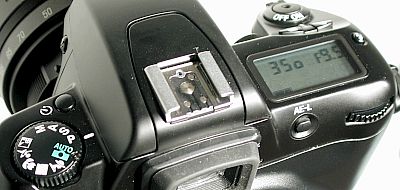
dial by a relevant symbolic icon.) Other
S1 Pro features shown at right include
the main command dial, exposure
compensation plus & minus controls,
automatic exposure lock, self-timer,
popup flash synchro option button, and
a hot shoe for external Nikon
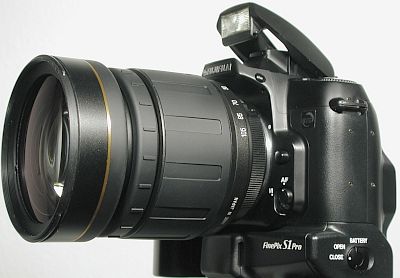
compatible flash units. Pictured
at left is the built-in popup flash in
the ready position, the manual focus /
autofocus selector switch, and the
flip-down AA battery compartment door.
Lens
shown in this picture is Tamron's
28-105mm f2.8 zoom. For those who are used to
a full feature professional level camera like
the Nikon D1, the Canon EOS digitals, or the
Kodak Pro digital cameras, there will be some
things you'll have to learn to live with
- But the positives far
outweigh the shortcomings - Look at
what you do get! An
affordable, easy to use full-sized
single lens reflex digital camera that
uses interchangeable Nikon F-Mount
compatible lenses. For probably 90% +
of day to day shooting situations, the
features and options on the S1 Pro are
all you really need. Serious
thought... In spite of the lack of bells &
whistles, in spite of the (some consider)
too-simple features and options, the most
important thing of all is "how do the pictures
come out?" In that
category, it looks like the S1 Pro might be the
best player of all.
Sample
Pictures - All
original pictures taken with the camera set at
"2304" image size, jpeg fine quality, color /
tone / sharpening @ standard
(default). Click
on any preview below for an enlarged view. High
ISO pictures with the Fuji S1 Pro
- The
general rule of thumb for all
photography is to use the lowest ISO
(capture sensitivity) setting possible
for an acceptable aperture &
shutter speed combination. This will
result in the cleanest, clearest,
richest looking pictures possible from
your camera. But
there are times when high ISO settings
are a must... In low
lighting conditions with a low ISO
setting, the camera's aperture will
open up and the shutter speed will slow
down in order to gather in enough light
to make a properly exposed picture. The
biggest potential problem here is that
the longer shutter times tend to create
blurred pictures because of subject
movement or camera shake. To
overcome this, you can use higher ISO
settings to automatically create faster
shutter speeds at any given aperture.
(Faster shutter speeds eliminate
blurred pictures caused by subject
movement or camera shake.) Example:
(Given a constant aperture) A 1/30th
shutter speed doubles to 1/60th if you
raise the ISO from 400 to 800. And at
ISO 1600 the shutter speed will double
again to a snappy 1/125th of a
second. High
ISO settings (800 or above) on most
digital cameras produce markedly
increased grainy or noisy appearances
to their pictures, sometimes to the
point of being nearly unusable.
Not so
with the S1 Pro! Perhaps
the most impressive thing I've found
with the S1 Pro is the picture quality
of its high ISO output. From its base
of ISO 320 all the way to ISO 1600, the
S1 Pro produces excellent quality
images. Sure, the quality declines
somewhat as the ISO increases, but not
to any great extent. Because of this,
available light (no flash) photography
becomes an exciting, greatly expanded
avenue to explore. In any
given shooting situation, I evaluate
the aperture I'd like to use (because
of depth of field issues), look at the
shutter speed in the camera's
viewfinder, and roll up (or down) the
ISO until I get the shutter speed I've
calculated as ideal for a blur-free
shot. And if I can't get enough shutter
speed at ISO 1600, I'll roll down the
aperture a notch at a time until I get
it. More
ISO 1600 sample pictures -
Reviews /
Reports: Link
to Steve's Digicams Fuji S1 Pro
review. Fujifilm
Corporate Site: Link
to the Fuji (Japan) S1 Pro Home
Page
General Information
- (The
following information is from Fuji's original
press release) The first of a
new breed of professional digital cameras from
Fujifilm, the FinePix S1 Pro has a 1.1 inch
Super CCD sensor that delivers an ultra-high
resolution image file with 6.1 million pixels
(3040 x 2016). It uses a Nikon F lens mount and
has continuous shooting of approximately 1.5
frames/second up to five frames, adjustable ISO
equivalents of 320/400/800/1600, a shutter speed
of 30 to 1/2000 second and compatibility with
SmartMedia™ (up to 64MB),
CompactFlash™ (Card Type II) and the IBM
microdrive™. The
unprecedented image resolution of the FinePix S1
Pro is the result of Fujifilm’s proprietary
Super CCD technology. Recognizing a glass
ceiling in the conventional charge-coupled
device (CCD) design, Fujifilm developed a new,
radically different CCD with larger,
octagonal-shaped photodiodes situated on
45-degree angles. This pattern increases
sensitivity, improves signal-to-noise ratio and
offers a much wider dynamic range, all
attributes that result in sharper, more colorful
digital images. "Like other
professional SLR-type digital cameras, the
FinePix S1 Pro has a host of image capture
features and controls," said Tom Cuffari, Vice
President, Sales, Digital Imaging Division, Fuji
Photo Film U.S.A., Inc. “But the one thing
that makes the FinePix S1 Pro stand out among
the rest is its printable image quality which,
if you ask any photographer, is the most
important aspect of the camera.”
As mentioned,
the FinePix S1 Pro has a variety of controls,
including four shooting modes (single frame,
continuous, preview and multiple exposure), five
exposure modes (general-purpose program,
auto-multi program, shutter-priority auto mode,
aperture-priority auto mode and manual exposure
control) and five variable program modes
(portrait, landscape, close-up, sport and night
scene). In addition, there are eight modes for
white balance (auto, fine, shade, incandescent
light, custom and three for fluorescent light.)
The FinePix S1
Pro can record images at three resolutions (3040
x 2016, 2304 x 1536 and 1440 x 960) and in three
file formats (TIFF-RBG, TIFF-YC and JPEG). There
are three compression modes (fine, normal and
basic) within the JPEG file format and captured
images can be viewed on the camera’s 2-inch
liquid crystal display. The
USB-compatible FinePix S1 Pro has dimensions of
5.8” (W) x 4.9” (H) x 3.1” (D)
and weighs 29 ounces. Packaged along with the
camera are a CD-ROM with camera-shooting
software, USB and video cables, a 16MB
SmartMedia storage card and four AA alkaline
batteries for the image-handling system and two
Lithium batteries for controlling the camera
system.
Suggested
retail price - around $4,000. Fujifilm FinePix
S1 Pro - Specifications:
Super CCD Information
- The
following memo was provided by Fuji to
its S1 Pro dealers. Although not
necessarily "new" information, it might
help clarify some of the controversy
and confusion about some recent
questions and issues regarding the
Super CCD and image
resolution: (Memo
to: FinePix S1 Pro Dealers) "Attached
to this e-mail is a ... document which
you might find useful in explaining to
your customers how and why we are able
to produce higher resolution images
with our new Cameras utilizing the
Super CCD chip design... " (Copy
of document below) Super CCD
Technology Explained The introduction of Fujifilm's
patented Super CCD has created much
controversy in the Digital Photography
arena. Debates over resolution and
interpolation can be heard on the trade
show floor, web site chat rooms, and in
periodicals. Eventually they make their
way to you, the Fuji Dealer, who may
then be forced to defend our position
and clarify the misunderstandings. To
assist you with the daily chore of
explaining the Super CCD technology, we
have summarized the major differences
between this breakthrough technology
and the conventional CCD. Get the picture…. Get the
Color! One of the key characteristics of
the Super CCD to remember is that it
has larger photo sensors than a
conventional CCD and therefore collects
more color information, resulting in
better color pictures! This added color
data produces an image quality
comparable to the level of silver
halide photography. As a result, the
print will become the only evidence you
need to support the technology.
Remember that CCD resolution and image
file resolution is not a one to one
relationship, this is true for
conventional and Super CCD's. All
digital cameras need to interpolate to
mix a ratio of red, green and blue CCD
sensors into a single combined image
file pixel with red, green and blue
color values. Resolution and
Interpolation CCD resolution and image file
resolution is not a one to one
relationship. Therefore, the number of
sensors on a CCD does not directly
relate to the number of pixels in the
final image file. This is true for both
Super CCD and conventional CCD's. The
change over from physical photo sensors
on a CCD to the image file is due to
interpolation. Therefore, all digital
cameras interpolate. This is because
each pixel of the resulting image file
is usually made up of analog data from
at least 2 greens, 1 red, and 1 blue
photo sensors from the CCD. This mixing
is what interpolation is all about. Why do Super CCD cameras have so
much more image file
resolution? A Super CCD camera produces image
files with a greater number of pixels
than conventional CCD cameras due to
the new geometry of the Super CCD and
Fujifilm's image processor that
features PxGA Technology. The best way
to simply show how the new geometry
works in layman's terms is to
demonstrate using the game of
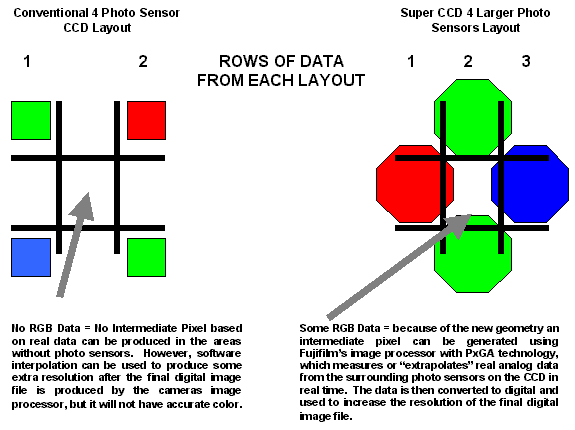
tic-tac-toe. Conventional CCD's have surface
architecture that the Super CCD does
not need; therefore the photo sensor
size can be increased without
increasing the physical size of the
CCD. In addition to this, the shape was
changed to an octagonal shape to
improve its micro lens efficiency and
to accommodate a totally new sensor
pattern. The new sensor pattern allows
Fujifilm's image processor to make
better use of horizontal and vertical
data. Although very simplified, the
diagrams below demonstrate the general
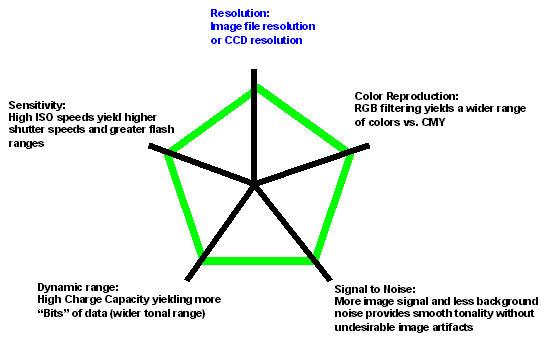
benefits of the Super CCD system. The 5 points to a high quality
image capture CCD resolution is only one of 5
quality measures of how well any
digital camera can capture the scene.
However, until the Super CCD was
designed, the digital camera industry
focused primarily on the "Mega Pixel"
count as the most important quality
measure. This was because most digital
cameras lacked enough resolving power
for the other 4 quality measures to
effectively impact the final image
quality. At the time, it also gave
consumers a way to measure the cameras
overall quality. The real benefit of Super
CCD! Fujifilm has found a way to utilize
fewer physical photo sensors on a CCD
to reduce the detrimental imaging
effects of trying to increase image
file resolution by the reduction of the
size of photo sensors. Fujifilm is
unique in that it is a manufacturer
that is capable of developing both a
CCD and is a market leader in
photographic manufacturing technology.
Therefore, Fujifilm can now truly bring
to digital photography the image
quality of traditional film imaging.
The results are better pictures with
more realistic color through the
blending of technology and photographic
processing and printing know how. (End
of document)
|

.jpg)
.jpg)
.jpg)
.jpg)
.jpg)
.jpg)
.jpg)
.jpg)
.jpg)
.jpg)
.jpg)
.jpg)