|
|
|
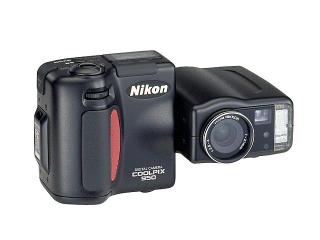
Nikon
CoolPix 950 Evolution of
the Sample
Photos - Click
on the thumbnail pictures below for
full screen viewing The
file sizes of the pictures are shown
below the thumbnails in approximate
kilobytes (bytes x 1000) to give you an
idea of download time.
A Worthy
Successor The new CoolPix 950 has proven itself to be a
worthy successor to the most popular digital
camera ever built, the Nikon CoolPix 900. The
enhancements in picture quality, features, and
construction make the 950 even better than its
excellent predecessor. It's hard to believe the
camera has all these 'bells & whistles', and
I can still slip it into my pocket! The first thing I noticed when I turned the
camera on was the actual (real time) f-stop and
shutter speed values displayed in the lower left
hand corner of the LCD screen, much like what
you'd see through the viewfinder of a high
quality 35mm SLR camera...
Yes!!! The camera starts up fast, switches modes
fast, and processes fast - all characteristics
you need when time is of the essence for
grabbing a candid shot opportunity. The pictures are a bit sharper and the colors
a bit more saturated than the CoolPix 900. Color
tones appear to be "right on". Basically,
nothing was lost in the already excellent
picture quality with the new model, and
significant gains were made in areas that often
required some "tweaking" with the original
CoolPix 900. And for low light shooting, the easily
adjustable ISO puts the shutter and aperture
balance into a comfortable range.
The U.P.S. delivery truck didn't come until
the end of the day, and by the time I got home
to unpack the box, it was already dark.
Hm-m-m-m... "seize the opportunity", I thought.
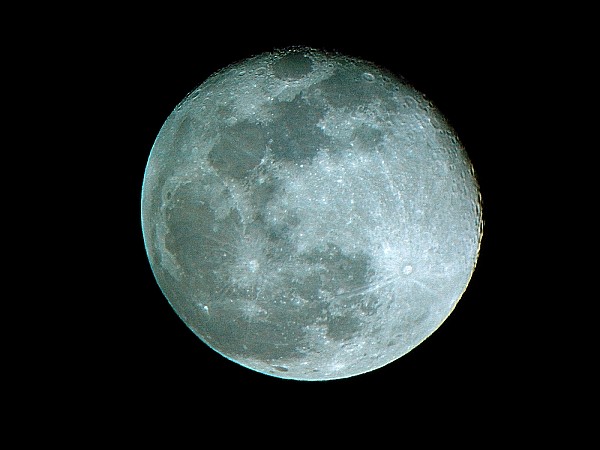
The Moon was full, and the skies were crystal
clear. So I mounted the new CoolPix 950 on my
CKC
Power Phoenix Spotting Scope Kit and
went outside to give it a try. This would be a
good comparison with my CoolPix 900 - a proven
winner when mounted on the powerful spotting
scope. The results were dramatic. And the 950
seemed like it had the edge on the 900 in its
very first outing. Here's the picture... The spotting scope was
set at approximately 20x. The camera was set on
3x optical zoom, auto exposure, tripod mounted,
and with the self-timer to eliminate "camera
shake".
Besides
being an excellent 'snapshot' digital camera for
everyday use, the CoolPix 950 has some special
attributes that give it great versatility and
flexibility...
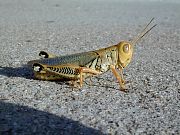
Macro Photography -
In the tradition of the original CoolPix 900
& 900s, the 950 takes superb Macro pictures.
No extra accessories, special lenses, or wierd
tricks necessary.
Available Light
Photography* using the new adjustable ISO
feature - (*Also known as "natural light", "existing
light", or other similar descriptions of
flash-free low light photography.) The adjustable sensitivity of the
CoolPix 950 is a simple and straightforward way
to achieve faster shutter speeds, by increasing
the ISO (film speed equivalent) of the camera as
necessary. The 950 has easily settable ISO option speeds
of '80' (default), '100', '160' (called +1 by
the camera), and '320' (called +2 by the
camera). In the menu under the "M Record"
(Manual) position, these settings are found
under "Sensitivity". They are only available in
the "M Record" mode... In the "A Record"
(Automatic) mode, the ISO is fixed at the
default 80 setting, and is not adjustable. Changing the camera's sensitivity to a higher
ISO setting will lessen the quantity of light
necessary to take a picture. Shutter speed will
be faster, and at a direct mathematical
ratio. As an example, with the aperture (lens
opening size) constant, if the camera required
1/2 of a second to expose a picture at ISO 80,
it would only require 1/4 of a second at ISO
160, or 1/8 of a second at ISO 320. Double the
sensitivity (ISO number), half the quantity of
light required. And faster shutter speeds lower
the risk of blurred pictures. Thus, by merely
increasing the ISO sensitivity settings, the
risk of blurred pictures in low light conditions
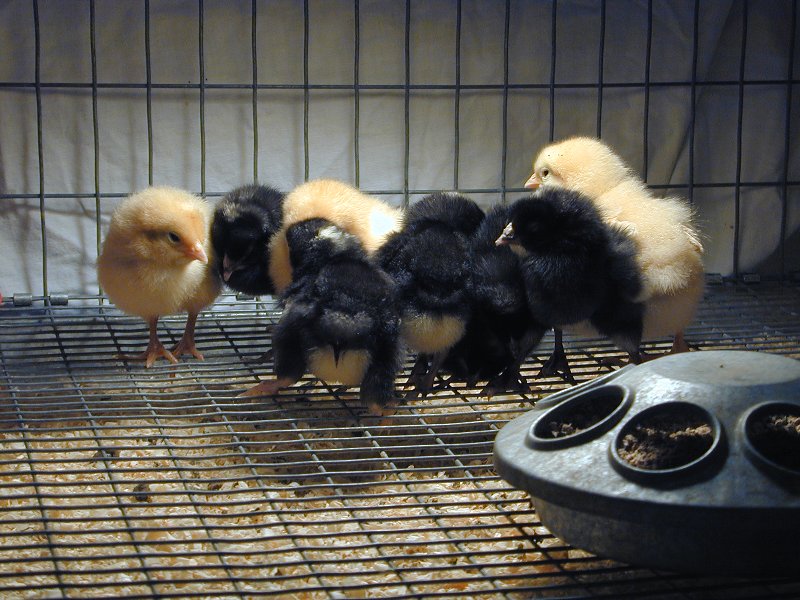
can be reduced. Here's an available
light ISO 320 picture I took while
trying out some advanced features...
The increased sensitivity of ISO 320
allowed a hand held blur-free shutter
speed of 1/60th of a second in very dim
light as the baby chicks were hopping
around. With the default ISO
80 setting, the shutter speed showed to
be 1/15th of a second, which most
likely would have resulted in a blurred
picture. Click
on the preview at left for an
800x600,
Creative Photography Using
Exposure Options -
Exposure Priority (Shutter
or Aperture Priority) * Additional information on using shutter
and aperture control is very nicely covered
in Chapter
One of Dennis Curtin's "A Short Course in
Creative Digital
Photography"
Sorry, the CoolPix 950 does not have a fully
manual mode. You cannot select both a
specific shutter speed and aperture size at the
same time. However, you can "almost" be
in complete manual control, by using the
CoolPix 950's Exposure Compensation...
The automatic exposure calculations can be
modified in any exposure mode by using
the 'EV +/-' option. (EV stands for Exposure
Value.) * Note: A well
written explanation of EV (Exposure Values) is
located at Toomas
Taam's Photo Website - Exposure
Values . In 1/3 steps, up to EV + or - 2.0, the
exposure values will be increased or decreased.
This is done by increasing or decreasing shutter
speed and aperture from the standard calculated
values. As such, you can "bracket" exposures on
a subject to ensure the desired results... take
a group of pictures above and below the standard
calculated exposure and you're likely to get it
"just right". Or, in a given situation, if you
"know" from your experience that a picture will
turn out too dark or too light, you can
compensate accordingly. A general indicator of
the expected results can be seen in the LCD
screen before the picture is taken. (And of
course reviewed in the LCD screen afterwards,
also.)
Matrix, Center-Weighted,
or Spot Metering -
Internal Image
Enhancements - In the "Manual Record" menu, there is an
option to select one of the following
four internal processing enhancements. The
enhancements (slight) are done in the camera
after the picture is taken.
Telephoto Opportunities
- The 28mm threaded lens opening is well suited
for add-on lenses and filters. Nikon has its own
2x optical teleconverter with 28mm threads (Part
Number TC-E2), which simply screws into place on
the camera's lens. It doubles the focal length
range of the camera without loss of resolution,
to a maximum of 230mm (six times greater than
the normal 38mm wide angle view without the
lens). Aftermarket lenses, spotting scopes, or
monoculars may also be used with special
adapters, called "stepup rings". Some users have
successfully adapted full sized astronomical
telescopes with dramatic results.
More Nikon 950 "Favorite
Features" -
Could have been
better?
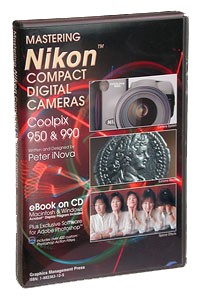
Peter
iNova's "Mastering Nikon Compact
Digital
Cameras"
is primarily written for owners of the
popular CoolPix 950 & 990 series
cameras, and carries a wealth of
extremely useful, accurate &
interesting knowledge applicable to all
kinds of digital photography.
Special
Adobe PhotoShop techniques &
filters will please (and surprise) even
the most seasoned digital veteran.
There are 245+ filter settings included
with the book, preformatted as Adobe
PhotoShop Actions for your use in a
wide range of color correcting or
special effect situations. Example?
A simple "Contrast Filter" to help
clarify a hazy looking picture... Try
these numbers for yourself in Adobe
PhotoShop: Unsharp Mask 20%, Radius 65,
Threshold 0. Seems like a very odd
combination, but it sure
works! No
matter what kind of digital camera you
have, this book's a winner. And if
you have a CoolPix 950 or 990 it's a
must!
Specifications
- CCD 1/2
inch high density CCD, Total number of
pixels: 2.11 million Image
Size Choice
of 3 pixel sizes: 1) 1,600 x 1,200
pixels (UXGA), 2) 1,024 x 768 pixels
(XGA), 3) 640 x 480 (VGA) Lens 3x
Zoom-Nikkor lens; multicoated, 9
elements in 7 groups, aspherical glass
lens; f = 7 mm to 21 mm with macro
(35mm format equivalent: 38 mm to 115
mm); F 2.6 ~ 4; fisheye, wide-angle and
telephoto adapter can be attached
(optional) Digital
zoom 4-step
digital zoom: 1.25x / 1.6x / 2x / 2.5x
Autofocus Contrast-detect
TTL autofocus; 4,746 step autofocus
control Focus
mode Selectable
by menu on LCD : 1) Continuous AF mode,
2) Single AF mode, 3) Manual Focus (10
steps from approx. 4 inch (0.1m) to
infinity) Shooting
distance 12 inch
to infinity, 0.8 inch to infinity in
macro mode Exposure
metering 3 mode
TTL metering, 256-element Matrix, Spot
and Center-Weighted Shutter Mechanical
and charge-coupled electronic shutter
1/750 to 8 sec. Aperture Electromagnetic
drive rounded diaphragm opening; 3
steps at F2.6/F4/F7 (Wide end), F11.4
minimum (Tele end) Exposure
control Programmed
Auto Exposure (AE), Shutter-priority
Auto, Aperture- priority Auto, Manual
exposure compensation (±2EV in 1/3
EV steps) Exposure
range EV-2~15.5
(W), EV-0.8~16.7 (T), ISO 100
equivalent Sensitivity Approx.
ISO 80 equivalent; Gain increase
available: 1) Default (approx. 80),
2)100 (approx. 100), 3) +1 (1EV
equivalent gain up from default), 4) +2
(2EV equivalent gain up) White
balance Automatic
TTL homing system, can be set manually
for 1) sunny, 2) cloudy, 3)
incandescent, 4) fluorescent, and 5)
flash conditions. Preset white balance
available, which allows users to set
white balance using a white subject,
such as a white card or sheet of white
paper, prior to actual shooting
Tone
curve selection 5 User
selectable image tone curve settings;
1) Standard, 2) Contrast+, 3)
Contrast-, 4) Brightness+, 5)
Brightness- Self-timer Selectable
10-second or 3-second duration
Viewfinder Real
image optical zoom viewfinder;
Magnification: 0.44x to 1.2x; Frame
coverage 80 ~ 85%; Diopter adjustment:
-2 to +1 dpt.; LED indication for
Speedlight Ready and Focus Ready
LCD
monitor 2-inch,
130,000-dot, low-temp. polysilicon TFT
LCD; Adjustable back light; Update
rate: 30 frames/sec.; Frame coverage:
approx. 97% Auto
power save Factory
default 30 seconds auto shut off; can
be changed to 1, 5 or 30 min.
Image
recording File Formats TIFF
RGB (Uncompressed) or JPEG (Exif 2.1);
24 bit RGB color Multiple
folders supported - Folders except for
the default folder can be renamed
Mode -
Hi = Uncompressed RGB TIFF, Fine = 1:4
JPEG, Normal = 1:8 JPEG, Basic = 1:16
JPEG (Approx.) Storage
Media Removable
CompactFlash™ card Capacity*
- Hi = 1 img., Fine = 8 imgs., Normal =
16 imgs., Basic = 32 imgs.
(8MB) *
Number of images may vary depending on
the image captured and the resolution
selected. Shooting
mode Fully
automatic mode (A-REC); Programmable
manual mode (M-REC); allows 3 custom
groups of settings chosen from shooting
menu options Shooting
menu 1)
Metering, 2) Capture mode, 3)
Sensitivity, 4) White balance, 5) Tone
compensation, 6) Best-shot selector, 7)
Monochrome, 8) Digital zoom, 9)
Converters (for adapter lenses), 10)
Auto file numbering Best-shot
selector Camera
takes 5 shots automatically (within
approx. 1.5 fps) and records the most
detailed image of the 5 shots using
anti-jitter logic, which is effective
for telephoto shooting and macro
shooting. Not available when the
Speedlight is on Capture
mode 1)
Single, 2) Continuous, 3) High speed
continuous, 4) Multiple continuous
Capture
speed 1)
Single mode: Approx. 1 fps for full
size or smaller size images. Users need
to release the shutter button after
every shot. 2) Continuous mode: Approx.
1.5 fps for full size or smaller size
images up to 10 images. Camera captures
1 frame every 0.8 sec. when the shutter
button is depressed. 3) High speed
continuous mode: Approx 2 fps for VGA
size images up to 60 images. Camera
captures 1 VGA size image every 0.5
sec. when the shutter button is
depressed. Image size is fixed in VGA
in this mode. 4) Multiple continuous:
Approx. 2 fps. Camera captures 16
continuous images and puts all 16 into
1 full size image frame. Built-in
Speedlight Guide
number - 30 feet (at ISO
100) Flash
modes - 1) Auto-flash, 2) Flash-off, 3)
Force fill flash, 4) Slow-sync and 5)
Red-eye reduction (Flashes for 0.8 sec.
before main flash) External Speedlight
Multi-flash sync terminal connects to
external Nikon Speedlight SB-28, SB-26,
SB-25, SB-24, SB-22s through the
Multi-flash Bracket Unit (SK-E900).
Built-in Speedlight can be disabled
when external Speedlight is used
Playback
function 1) 1
Frame, 2) Thumbnails, 3) Slide show, 4)
2x or 3x zoom playback with panning
capability, Hide and protect attributes
can be set for each image Delete
function Deletes
all frames or selected frames
Platform Windows95
or later, NT4.0 or later, Macintosh OS
7.5.1 or later Interface Serial
interface (Windows: 115 kbps,
Macintosh: 230 kbps) Video
output NTSC
video signal output for image display
on standard TV set I/O
terminal Power
input, video output, Serial port, Sync
terminal for external Speedlight(s)
Power
requirements 4 x
Alkaline, 1.2V NiCd, 1.5 NiMH or 1.5V
FR-6 Lithium AA batteries, AC adapter
(optional) Battery
life Approx.
60 min. with LCD monitor on using
alkaline batteries at room temperature.
Approx. 90 min. in playback mode
Dimensions (W x H
x D) 5.6 x 3.0 x 1.4 in. Weight Approx.
12.3 oz. without batteries Warranty 1 year
Accessories
included Soft
case, Strap, Video Cable; 8MB
CompactFlash™ Card , Serial Cable
(Windows), Mac adapter; NikonView
Version 2 CD ROM, Lens cap; 4 AA
batteries, "Open me first" envelope;
Registration / Warranty card, Fast
Track Guide, Hardware & Software
Manuals Bundled
software NikonView
Version 2, Hotshots (PictureWorks),
IPIX (Interactive Pictures) Wide
angle adapter Number
of lenses: Two elements in two groups,
Magnification:
x0.66 Combined
focal length: 24mm - 72mm (35 mm
equivalent) Combined
F number: 2.4 at maximum angle
Angle:
88° at maximum angle Minimum
distance: Approximately 2 inch from the
lens Dimension:
1.95 inch diameter x 0.98 inch length
Weight:
2.04 oz. Fisheye
lens Number
of lenses: Five elements in four groups
Magnification:
x0.209 Combined
focal length: 8 mm (35 mm equivalent)
Combined
F number: 2.4 Angle:
183° Tele
converter lens Number
of lenses: Four elements in three
groups Magnification:
x2.0 Combined
maximum optical focal length: 230 mm
(35 mm equivalent), up to 575 mm (35 mm
equivalent) when combined with the
maximum setting of x2.5 digital
telephoto. Combined
F number: F4 (E950), F3.6 (E900)
Angle:
11° Dimension:
1.77 inch diameter x 2.56 inch length
Weight:
Approximately 5.29 oz. Other
Nikon Brand Accessories: AC
adapter EH-30 CompactFlash™
cards EC-4CF, EC-10CF, EC-15CF,
EC-30CF, EC-48CF, EC-64CF PC card
adapter: EC-AD1 CompactFlash™
Card Reader: MDCF (Parallel interface
for PC computer) |