|
|
|
|

|
Digital
Photography
Opinions, Observations,
Articles, Insights, and
Tutorials
|
|
|
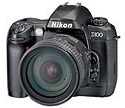
Nikon
D100
Nikon's
D100 Digital SLR is lightweight, easy
to use, 6 Megapixels strong, and has a
street price under $1,500. It's hard to
imagine that four or five years ago it
took more than $20 Grand to buy a
Nikon-bodied 6 Megapixel Digital
SLR.
|
|
The
D100 is a favorite among Pros and
Amateurs alike... Why?
- Picture
quality: The consensus among
experienced users is that the D100
produces pictures equal to the "best
of the best" pro digital cameras. In
fact, many professional
photographers actually prefer the
output quality of the Nikon D100
over the Nikon D1x.
- The
battery: The small, lightweight
rechargeable Lithium Ion battery
keeps on going, going, going.
Typical comments from D100 owners...
"500+ shots and the battery meter
still shows full..." "I took over a
thousand pictures in two days and
never recharged the battery..." "The
camera sat idle in my camera bag for
weeks, I took it out & shot all
day long... and never ran low on
power..."
- The
battery charger: Two or three hours
for a full charge on a completely
dead battery. No need to ever drain
& refresh the battery. And the
charger & power cord are small
enough to put in one of the side
pockets of a camera bag. That means
that I'll never get stuck high &
dry if I'm on a trip, because I can
easily recharge the battery if I
need to. I also carry a small 12v DC
to 110v AC power inverter with me,
which simply plugs into my truck's
12v accessory plug and easily powers
the charger.
- The
weight. It's really
lightweight. Which makes it a
pleasure to carry around, even
one-handed.
- The
size & shape: The grip fits my
hand nicely (and securely). And it
takes up less room in my camera bag,
which means I can carry one more
lens.
- The
built-in flash. It's right there for
unexpected / unplanned flash
situations. Sure, a dedicated
external speedlight is always
better, but for those quick candid
flash shots or unexpected times when
a little fill flash boost is needed,
it's right there, just a flip of a
button away. Yes, I also have &
use a 'real' speedlight (a Nikon
SB-80DX), but it's not very quick to
mount if I see an unexpected photo
moment that needs a little fill
flash.
- The
placement of the LCD screen. It's
dead center - which means no nose
prints. On the other hand, it's
right under your nose, so on
a cold or very humid day, breathing
through your nose fogs up the inside
of the included snap-on clear LCD
screen cover. The top corners of the
clear LCD screen cover have enough
of an air gap to allow this to
happen. Solution? I took my LCD
cover off and put it back in the
box. (And I think the camera looks
better without it.)
- The
wide ISO range. ISO 200-1600 in
1/3rd stop increments, plus Hi-1
(ISO 3200) and Hi-2 (ISO
6400).
- Nikon's
software: The included Nikon View
software (free) does a good job of
viewing & basic processing of
Raw files. Also included is a trial
edition of Nikon Capture software,
considered to be the best raw file
processing software in the industry.
You can use Nikon Capture free for a
30 day trial, then it's around $100
to buy a permanent registration code
if you decide to continue using it.
I strongly suggest buying Nikon
Capture.
|
Day to day
shooting with the D100
I love the D100
for everyday shooting because it's ready to
shoot as soon as I turn it on (virtually no
startup lag), and using Raw format, I don't
worry about having to make changes to my
standard camera settings. When I see photo
opportunities like the ones shown below, it's
easy to pick up & take a quick shot that I
know will turn out good. With Raw format, even
if there's a problem with exposure, contrast,
sharpness, white balance, or almost anything
else, I can easily correct it after the fact on
my computer with Nikon Capture
software.
|
.jpg)
|
Donkey
Roundup
ISO 200
snapshot, Raw format, Color Mode I
(sRGB), programmed automatic exposure,
Low Tone (Contrast), Matrix Metering,
Nikon 20-35mm f2.8 D Wide Angle Zoom
lens, Exposure Compensation set at
+0.3.
Click
to enlarge, 1200 x 798 pixels, 429
KB.
|
|
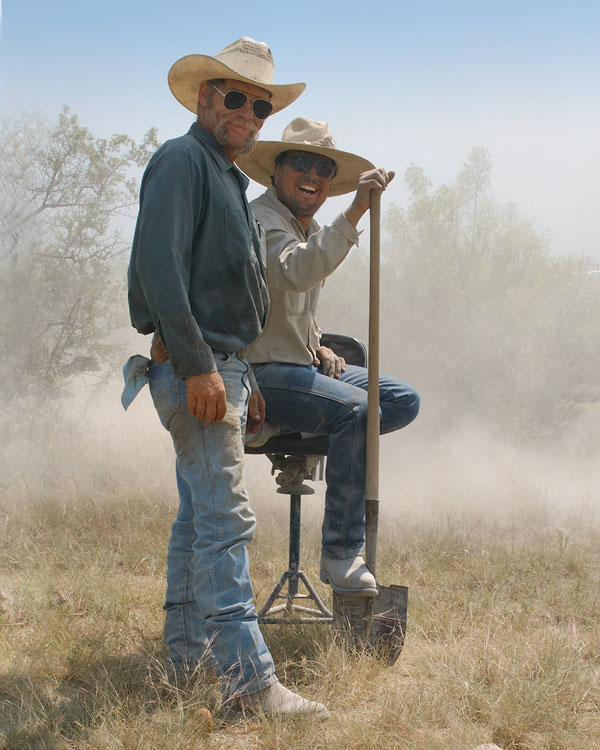
"We'll
see what happens when the dust settles
... "
Distant
picture at right, closeup picture
below. Shrouded in an fog like
cloud of dust from a (so far) dry hole,
a couple of Texas well drillers stand
by as their equipment grinds its way
down through the layers of dirt &
rock in search of underground water.
ISO 200 snapshot, Raw format,
programmed automatic exposure, Exposure
Compensation set at +0.3, Low Tone
(Contrast), Matrix Metering, Nikon
20-35mm f2.8 D Wide Angle Zoom lens,
Color Mode I (sRGB), built-in D-TTL
popup flash used to add additional
lighting to the shadowed driller's
faces (fill flash).
|

Click
to enlarge, 1024 x 680 pixels, 291
KB
|
Click
to enlarge, 1000 x 1250 pixels, 471
KB
|
Fresh
from the Fish Farm
Somebody's
having fun watching a tank full of of
young, frisky channel catfish being
stocked into our pond.
ISO 200
snapshot, Raw format, Color Mode I
(sRGB).
|
.jpg)
Click
to enlarge, 1200 x 797 pixels, 337
KB.
|
How I set
up my D100 for everyday use
- Tone
(Contrast) Low
- Color sRGB
Mode 1
- Sharpening
None
- White
Balance: Auto
- ISO
200
- 3D Matrix
Metering
- Exposure
Compensation + 0.33 (Otherwise the D100 will
slightly underexpose 95% + of the
time)
- Focus Mode
Single Area AF (Dynamic AF OFF, Dynamic AF
with closest subject priority
OFF)
- Focus Area
Center point
- Focus screen
gridline display always ON
- Built-in AF
assist light permanently OFF (via Custom
Function Menu)
- Programmed
Automatic Exposure
- Shooting
Mode Single Frame
- Flash mode
Slow Sync
- Image
quality Uncompressed Raw **
(NEF) format. I switched to uncompressed Raw
the first day I set up my camera.
Uncompressed Raw writes to the memory card
reasonably fast, produces few aggravating
buffer stalls, and clears the camera's
write-to-card indicator light quickly. (Not
so with the camera's default
compressed Raw format, which produces
agonizingly slow write times.)
** Why Shoot Raw Format? Click
here for an article on why I shoot strictly
Raw.
Here's my
typical D100 Raw processing workflow using Nikon
Capture and Adobe Photoshop
In Nikon
Capture or Capture NX
- With
in-camera sharpening set on None, set the
Unsharp Mask Intensity at 65-70%, Halo Width
at 5%, Threshold at 4 levels.
- Turn Edge
Noise Reduction "On", leave the Color Noise
Reduction at 0.
- With Tone
Compensation set on Low, boost the contrast
In the Color Balance Palette to
+5.
- In the Color
Balance Palette, reduce the Red setting to
-2.
- Set the
Vignette Control Intensity to +150. This
balances out the lighting in the entire
picture.
- Adjust
Exposure Compensation if necessary. *If you
preset exposure compensation at +0.33 on the
camera itself, you probably won't need to do
this.
- Adjust White
Balance if necessary.
- Right click
on the picture and choose "Open with
Photoshop". The image will be transferred to
Adobe Photoshop as an 8 or 16 bit Tiff. (8
bit is preferred for most applications.)
In Adobe
Photoshop
- Do your
final adjustments, retouching, or printing
from Photoshop. If the picture is a "jewel",
save it as a compressed LZW Tiff (lossless)
file for future ease of use.
Two
frequently asked questions
How do you set
up a D100 to change from the default compressed
to uncompressed NEF?
- Press the
Menu button
- Go to the
Shooting Menu
- Right Arrow,
scroll to Image Quality
- Right Arrow,
scroll to NEF (Raw)
- Right Arrow,
select RAW NEF (Raw) instead of Raw Comp. and
hit the right arrow for 'ok'.
How do you
preset White Balance for difficult lighting
conditions?
- Turn the
camera on.
- Turn the top
dial to "WB"
- Turn the
thumb side dial until "PRE" shows on the top
LCD screen.
- Turn the
index finger dial (on the front of the
camera) and the top LCD screen letters will
blink.
- Hold a white
piece of paper or cloth a couple of inches in
front of the camera lens.
- Press the
AE/AF Lock button and press the shutter
button.
* You must hold the AE/AF button down or the
camera shutter won't fire.
- "Good" will
blink on the top LCD screen.
- Reset the
top dial back to your shooting mode
(Programmed, Aperture, Shutter,
etc.)
- To undo
Preset White Balance and return the camera
back to regular White Balance choices, turn
the top dial back to "WB" and turn the dial
until your choice reappears on the screen.
Then reset the top dial back to your
preferred shooting mode.
|
|